
AAWireless for Android Auto™
AAWirelessAuto & Vehicles
4.4888.00 Reviews
- Version
- 8.9.2844
- Installs
- 1.00M
- Age Rating
- Everyone
Screenshots
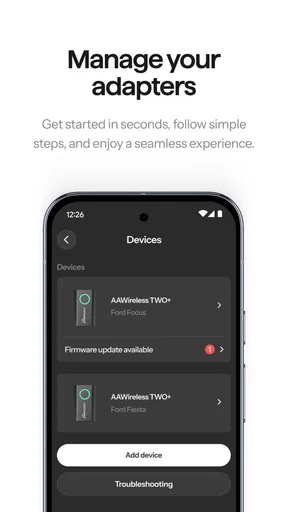
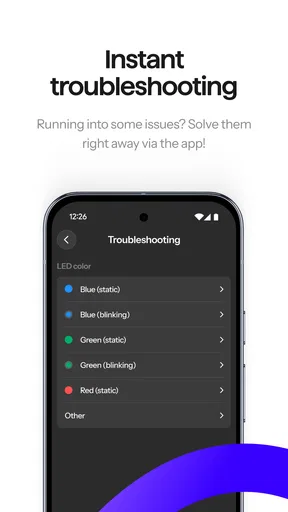
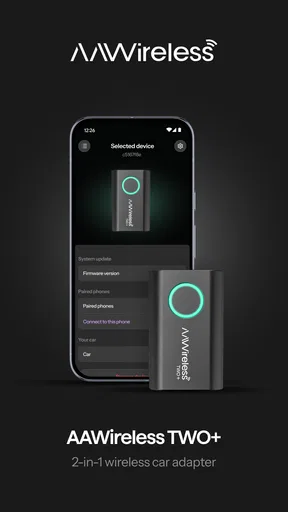
Our Review of AAWireless for Android Auto™
 Analysis by Appyee
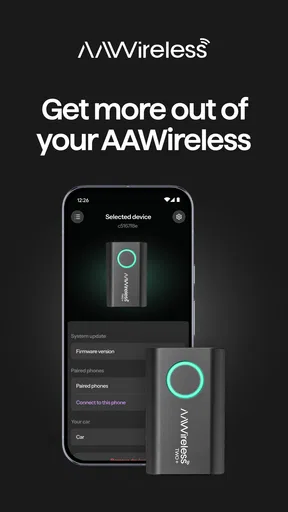
AAWireless is the companion app I would look at first if I wanted to make a compatible car’s Android Auto connection less dependent on a USB cable. Its job is not to replace Android Auto or turn a basic dashboard into a completely new infotainment system. Instead, it helps the AAWireless adapter communicate with the phone and gives me a place to manage that connection. That focused role is exactly why the app can be useful, but it also means the experience depends heavily on the adapter, the car, the phone, and the quality of the original wired Android Auto connection.
At its best, the app removes a small but constant annoyance: plugging in the phone every time I get into the car. Maps, calls, messages, and music can then appear through the vehicle’s Android Auto interface without the cable stretched across the center console. I found the biggest benefit was not a dramatic new feature on the screen. It was the change in routine. Starting a drive felt more natural because I could leave the phone in my pocket or on a charging pad instead of reaching for a cable before moving off.
Turning the AAWireless adapter into a practical daily connection
I find the adapter most useful when I treat the connection as part of the car’s setup, not as something to troubleshoot while I’m trying to leave. This section looks at how the app helps make that routine practical, including the small checks that can distinguish a phone-side hiccup from a car-side issue. From there, I’ll consider how the connection fits different kinds of trips and everyday mobile use.
The capability that matters most
The central capability here is wireless Android Auto through an AAWireless adapter. The app is made by AAWireless and belongs in the Auto & Vehicles category, but I would describe it more simply as a control point for the adapter rather than a standalone driving app. Android Auto still provides the familiar dashboard experience; this app helps the adapter establish and maintain the link between the vehicle and the phone.
That distinction matters when deciding whether it is right for you. If your car already supports wireless Android Auto, this companion app is unlikely to be the missing piece you need. If your vehicle only supports wired Android Auto, however, the adapter-and-app combination can make the existing system feel much more convenient. I would not buy it expecting better navigation data, a redesigned dashboard, or a replacement for the apps already running inside Android Auto.
The app itself is free, rated for Everyone, and available for devices running Android 9 or later. Its current version is 7.6.2659. Those details make it accessible to a broad range of Android users, although compatibility is still a practical question involving the car and adapter rather than the phone’s operating system alone.
The public response is encouraging without being a reason to ignore setup details: it holds a 4.4 average from around twenty thousand ratings, with over a million installs. I read that as evidence that the basic idea works well for many drivers, not as a promise that every vehicle will behave identically. Wireless car connections are unusually sensitive to combinations of head units, phones, cables, and vehicle software, so the individual result matters more than the headline rating.
What using it actually feels like
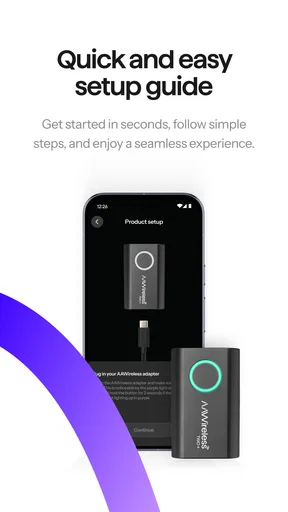
My first recommendation is to treat setup as a short troubleshooting project rather than a one-tap installation. The adapter has to be connected to the car’s Android Auto USB port, and the phone has to complete the required pairing process. Once that relationship is established, the app becomes useful for checking the adapter and adjusting its behavior instead of being something I need to open before every journey.
In normal use, I would start the car, wait for the adapter to wake, and let the phone connect. The screen in the dashboard remains the place where I use navigation, audio, and communication controls. That is a good design choice because it keeps the phone from becoming the main display while driving. The companion app’s value is mostly before and around the drive: preparing the connection, diagnosing problems, and fine-tuning the adapter when the default behavior does not suit a particular car.
A useful habit is to test the complete chain while parked. I would check whether Android Auto launches, whether steering-wheel controls respond, whether audio returns after a phone call, and whether the connection survives turning the car off and back on. Testing those points together is more informative than simply seeing the adapter appear in the app. A connection that starts successfully but fails after a short stop is not ready for daily reliance.
Another practical tip is to keep the original wired arrangement available during the first few drives. If wireless startup is slow or inconsistent, the cable gives me a fallback while I work out whether the issue is pairing, the adapter’s placement, or the car’s USB behavior. This is one of the trade-offs people often overlook: removing the cable from everyday use does not mean the cable stops being useful for diagnosis.
Where the app adds more value than the first setup
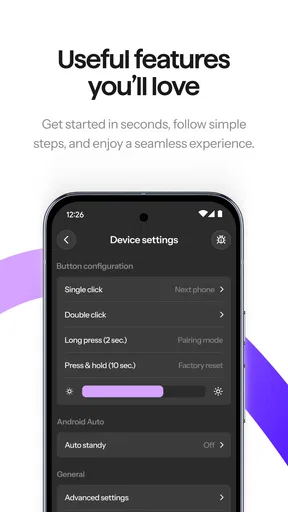
The strongest part of a companion app like this is what happens after the novelty wears off. When the connection behaves differently from the first test, I want a central place to inspect the adapter and change settings rather than repeatedly deleting pairings at random. The AAWireless app gives the adapter a maintenance layer, which is much more helpful than a simple “connected” indicator.
I would use that layer when moving the adapter between cars, changing phones, or trying to solve a problem that only appears after a vehicle restart. A setup that works perfectly in one car may need different choices in another because the head unit handles wireless startup, audio focus, or USB power differently. The ability to manage the adapter is therefore more important for households with multiple drivers than for someone who connects one phone to one car and never changes anything.
There is also a useful separation between phone troubleshooting and car troubleshooting. If the phone connects to the adapter but the dashboard does not launch Android Auto, I would investigate the car’s USB port and Android Auto support rather than blaming the app immediately. If the adapter is visible but the phone repeatedly fails to reconnect, I would focus on pairing and phone-side connection behavior. Thinking in those stages prevents the common mistake of resetting every device at once and losing track of what actually fixed the problem.
I also appreciate that the app’s purpose is narrow. It does not try to become another music player, navigation tool, or messaging hub. That means I spend less time inside it once everything is configured. For me, that is a strength: the app supports the driving system without competing with it.
The everyday scenario where it makes the biggest difference
Imagine a weekday commute with the phone already in a jacket pocket, a charging pad in the console, and a car that supports wired Android Auto but not wireless Android Auto. With a normal cable, I would need to find the connector, plug it in, and keep the phone positioned so the cable does not pull against the socket. With the AAWireless setup, I can start the car and allow the connection to come up while the phone stays put.
That sounds minor until it happens several times a day. Short trips are where the convenience becomes most noticeable because a cable connection can feel like more effort than the drive itself. The same applies when I am making several stops: I can leave the phone charging or stored safely instead of repeatedly handling it at the start and end of every journey.
The benefit is especially clear for drivers who use navigation frequently but do not want the phone mounted in front of them. The dashboard remains the main interface, and the phone can stay out of sight while still providing the Android Auto connection. I would still set destinations and adjust playlists before moving, of course, but the wireless link reduces the amount of physical handling around the start of a trip.
For family use, the experience can be less predictable. If several phones are present, the adapter may need to decide which one should connect, and the preferred phone may not always be the one that wins instantly. I would establish a clear routine before relying on it: keep the intended driver’s phone ready, avoid changing pairings during a trip, and use the app when the connection needs to be reorganized. Wireless convenience is greatest when the setup is stable; multiple phones introduce another layer of choice.
The trade-offs I would consider before relying on it
The first trade-off is convenience versus another device in the chain. Wired Android Auto has a pleasing simplicity: phone, cable, car. AAWireless adds an adapter and a companion app, so there are more points where a connection can fail. In return, I get freedom from the cable. Whether that is worthwhile depends on how often I drive and how irritating the cable is in my particular interior.
The second trade-off is startup behavior. A wired connection feels immediate when the cable is already attached. Wireless startup can involve a short wait while the car, adapter, and phone recognize one another. I consider that acceptable when it is consistent, but frustrating when I am trying to leave quickly. I would judge the product over several starts, including cold starts and brief stops, rather than deciding after one successful connection.
There is also a difference between wireless access and wireless charging. Removing the data cable does not remove the need to manage battery life. Navigation, mobile data, and screen activity can still consume power, so a long journey may require a charging pad or a separate power cable. For drivers without a convenient charging surface, the wireless connection may simply exchange one cable arrangement for another.
Another limitation is that the app cannot make unsupported hardware compatible by itself. If the car does not provide wired Android Auto in the first place, I would not assume an adapter can create that capability. The same caution applies if the vehicle’s Android Auto implementation is unstable with a cable. Wireless operation builds on the underlying system; it does not erase every limitation of the head unit.
Phone changes can also create friction. A new handset may need its own pairing and testing, and an update to the phone or car can alter connection behavior. I would keep the app installed even after setup because it is more useful when a problem appears than it would be if I had to reinstall it in the middle of troubleshooting. That maintenance role is easy to underestimate when everything is working.
How it compares with the usual alternatives
The obvious alternative is to keep using wired Android Auto. That remains the better choice for someone who values the fewest components, wants the most direct connection, or already has a cable route that is tidy and reliable. It also avoids adapter placement and wireless startup delays. I would choose wired Android Auto for a rarely used vehicle or a driver who does not mind plugging in for every trip.
A car with built-in wireless Android Auto is a cleaner solution when available because it removes the need for a separate adapter. The AAWireless approach is more relevant to people who already own a compatible wired system and want to modernize that one part without replacing the head unit. It is a retrofit convenience, not a complete infotainment upgrade.
Using the phone alone is another alternative, but I would not consider it equivalent for most drivers. A dashboard-integrated Android Auto display is easier to glance at and keeps the phone less involved physically. The companion app does not replace that interface; it helps deliver it wirelessly. If someone mainly wants navigation on the handset and rarely uses the car’s screen, the adapter may be unnecessary.
That comparison helped me place the app correctly. It is not competing with navigation apps or audio services. It competes with a USB cable, and its success should be measured by how reliably it removes that cable from routine use. Seen that way, the app is easier to evaluate honestly.
Who gets the most from AAWireless
I think this is a strong fit for a driver who already has wired Android Auto, uses the car often, and finds cable handling irritating. It is also appealing for people who keep the phone in a pocket or bag, use a charging pad, or make many short trips where plugging in feels disproportionate to the journey. The companion app gives those users a practical way to manage the adapter instead of treating it as an unexplained black box.
It is less attractive for someone whose car already includes wireless Android Auto, whose vehicle lacks Android Auto support, or who expects the app to improve navigation, sound quality, or the dashboard interface itself. I would also be cautious if absolute connection simplicity matters more than convenience. A reliable cable can be boring, but boring is valuable in a car.
For anyone considering it, I would make the decision in this order: confirm that the vehicle has wired Android Auto, check that the phone meets the Android requirement, install the companion app, and test the complete connection before depending on it for an important trip. Then I would try the car over several normal starts and stops. That process reveals whether the wireless benefit fits the specific vehicle rather than an idealized setup.
My final take after living with the idea
AAWireless succeeds because it concentrates on one meaningful improvement: making an existing Android Auto setup feel less tethered. The app is not flashy, and that is appropriate. Its real value appears in the small moments before a drive, when I can get moving without searching for a cable, and in the troubleshooting moments when I need more control than the car’s screen provides.
I would recommend it to the right kind of driver, not universally. For a compatible wired Android Auto car that is used every day, the reduction in cable handling can be genuinely worthwhile. For a vehicle with built-in wireless Android Auto or an unreliable underlying system, the extra adapter may add more complexity than it removes. My honest view is that the app is best understood as a practical bridge: when the hardware and car are a good match, the wireless convenience becomes part of the driving routine rather than a feature I have to think about.
Privacy and Permissions
See what permissions an app requests and how it handles your data.
- Photos/Media/Files
- read the contents of your USB storage, modify or delete the contents of your USB storage
- Storage
- read the contents of your USB storage, modify or delete the contents of your USB storage
- Wi-Fi connection information
- view Wi-Fi connections
- Other
- view network connections, pair with Bluetooth devices, access Bluetooth settings, change network connectivity, connect and disconnect from Wi-Fi, full network access, run at startup, draw over other apps, control vibration, prevent device from sleeping, read Google service configuration
Verdict
Strengths of AAWireless for Android Auto™
- Wireless Android Auto works reliably once initial setup is complete.
- Keeps the phone in your pocket instead of requiring a USB connection.
- Compact design takes up little space in the vehicle.
- Supports multiple phones and can switch between paired devices.
- Firmware updates add compatibility improvements and new settings.
Limitations of AAWireless for Android Auto™
- Requires a compatible Android Auto vehicle or head unit to function.
- Initial pairing may be confusing for less technical users.
- Wireless connection can drain the phone battery during long drives.
- Performance may vary with vehicle models and phone combinations.
- Adds another device that must remain powered in the car.
Other Releases by AAWireless
View All
Headunit Reloaded Emulator HUR
Maps & Navigation2.1
Similar Picks in This Category
View All
Android Auto
Google LLC4.1

maxim — order a taxi & food
PT. SITO4.7

Штрафы ГИБДД: проверка с фото
Pays LLC – Штрафы ГИБДД4.7

Номерограм – проверка авто
Авто Ассист4.8

Дром Авто
Дром4.9

Frequently Asked Questions
What is AAWireless for Android Auto™ and how does it work?
AAWireless is a small wireless adapter that lets compatible Android phones connect to a compatible car’s Android Auto system without plugging in a USB cable every time. After the initial setup through the companion app, the adapter communicates with the phone over Bluetooth and Wi‑Fi, while the vehicle continues to use its existing wired Android Auto connection. It does not add Android Auto to a car that does not already support wired Android Auto.
Which phones and cars are compatible with AAWireless?
Compatibility depends on both sides of the connection. Your vehicle must have a factory or aftermarket infotainment system that supports wired Android Auto, and your phone generally needs Android 9 or a later version with Android Auto support. Some older vehicles, head units, USB ports, and modified infotainment systems may behave differently. Before downloading the app or purchasing the adapter, check the official compatibility information and confirm that wired Android Auto works reliably in your car.
Do I need the AAWireless app to use the adapter?
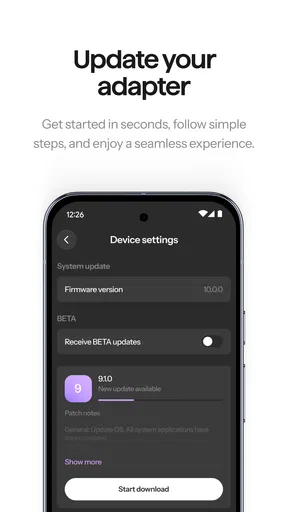
The AAWireless companion app is mainly required for initial configuration, firmware updates, connection settings, troubleshooting, and optional customization. Once the adapter has been set up, everyday use is usually automatic: start the car, allow the phone to connect, and Android Auto should launch through the vehicle’s display. Keeping the app installed is still useful because updates and advanced settings can improve compatibility with particular phones or cars.
Is AAWireless as reliable as a wired Android Auto connection?
In normal conditions, AAWireless can provide a convenient and stable experience, but wireless connections may be more sensitive than a direct USB connection. Performance can be affected by phone battery-saving restrictions, Wi‑Fi interference, outdated firmware, poor USB power, or unusual vehicle head units. Occasional reconnects or startup delays are possible. If problems occur, updating the adapter and app, changing connection settings, and removing battery restrictions often helps.
Can I use AAWireless with multiple phones, and is it safe while driving?
AAWireless can be configured for multiple phones, although the connection behavior depends on which paired device is available and how the adapter is configured. It is best to complete pairing and settings before driving. The adapter itself does not replace safe driving practices: Android Auto’s supported interface is designed for hands-free or minimal interaction, but drivers should avoid handling the phone, reading lengthy content, or changing settings while the vehicle is moving.
